Using Range joins in Apache Spark results in NestedLoopJoin or BroadcastNestedLoopJoin. Nested Loop Joins are the slowest join strategies.
To avoid a Nested Loop Join, we need an equality condition in the join. There are multiple ways to achieve it, depending on the use case and the feasibility of the approach for obtaining the correct results.
We will look into a simple implementation of changing this Range Join into a 2-step process:
- A Vectorized UDF to derive a column with the joining value using the Binary Search Algorithm
- Use this column for the equality join.
Understanding how a range join can be converted to an Equality Join
Let’s take a simple example of an IP-range-to-IP-location matching scenario to clarify it.
Assume we have a table called geo_location that includes ipstart, ipend, and the location to which this range belongs.
| ipstart | ipend | location |
|---|---|---|
| 1 | 10 | New Delhi |
| 11 | 36 | Bombay |
| 37 | 59 | Chennai |
| 60 | 99 | Kolkata |
Another table, records, has the id and ipnet columns.
| id | inet |
|---|---|
| 1 | 11 |
| 2 | 38 |
| 3 | 50 |
| 4 | 89 |
| The requirement is to identify the records present in the records table that belong to which location. | |
| In case of simple implementation, this results in a simple range-join like: |
-- SQL with Range Join
select r.id, r.inet, g.location
from records as r
left join
geo_location as g
on r.inet >= g.ipstart
and r.inet <= g.ipend
Breaking Range Join into Equality Join
If we look more closely at how this join will be implemented (logically, not technically), we can break it into an equality join.
inet = [11, 38, 50, 89]
ipstart = [1, 11, 37, 60]
To identify the location for these, if we can get the index of the ipstart value where inet can be inserted to keep the ipstart list sorted, that will give us the location.
Here’s what I mean:
inet = 11matchesipstart=11inet = 38can be inserted in betweenipstart = 37andipend = 59, i.e., after37inipstart, i.e. ipstart index 3ipstart[3]inet = 89can be inserted in betweenipstart = 60andipend = 99, i.e., after60in ipstart, i.e., ipstart index 4ipstart[4]
What this basically means is that if we do an equality join on the closest ipstart value, we get the correct location, i.e.,
inet = 38record location we can get fromipstart = 37location.inet = 89record location we can get fromipstart = 60location.
If you followed and noticed the pattern, what we really want to implement is:
- Identify the index in the
ipstartstart list whereinetvalue fits to keep the list sorted — basically a binary search to get the index. - Get the
index-1value from this sortedipstartlist for an equality join.
So we will derive a column called bucket_id in the records table that will hold values driven from the 2 steps above:
| id | inet | bucket_id |
|---|---|---|
| 1 | 11 | 11 |
| 2 | 38 | 37 |
| 3 | 50 | 37 |
| 4 | 89 | 60 |
Equality Join will be implemented as:
-- SQL with equality join
select r.id, r.inet, g.location
from records as r
left join
geo_location as g
on r.bucket_id = g.ipstart
Implementation in Apache Spark
Deriving the bucket_id in Spark will require a UDF.
Now, if you know a bit about Spark, it’s recommended to avoid using Python UDFs because it degrades the performance due to the deserialization and serialization cost of the data during the transfer between JVM ←> Python Process.
Starting from Spark 3.3, this cost is reduced by using Apache Arrow, which is used internally for transferring the data between JVM ←> Python Processes.
In addition, to maintain UDF performance for batch processing, it’s essential to use vectorized code in UDF.
So, keeping all of this in mind, we can use Spark’s pandas_udf along with numpy library to implement the code for deriving bucket_id
from pyspark.sql import SparkSession
from pyspark.sql.functions import pandas_udf, col
from pyspark.sql.types import IntegerType
import pandas as pd
import numpy as np

spark = (SparkSession
		.builder
		.master("local[4]")
		.appName("RangeOptimization")
		.getOrCreate())

# Geo Location table
geo_loc_table = spark.createDataFrame([
	(1, 10, "New Delhi"),
	(11, 36, "Chennai"),
	(37, 59, "Bombay"),
	(60, 99, "Kolkata")
	], ["ipstart", "ipend", "loc"])

# Records Table
records_table = spark.createDataFrame([
	(1, 11),
	(2, 38),
	(3, 50),
	],["id", "inet"])

# Broadcast the sorted array on which binary search will be used
ipstart_bc = spark.sparkContext.broadcast(
		list(
			map(lambda x: x.ipstart,
				geo_loc_table.select("ipstart").orderBy("ipstart")
				.dropDuplicates()
				.collect()
				)
			)
		)

@pandas_udf(IntegerType())
def get_bucket_id(batch: pd.Series) -> pd.Series:
	inet_vals = np.array(ipstart_bc.value)
	# binary search implementation in numpy
	indexes = np.searchsorted(inet_vals, batch.to_numpy(), side="left")
	bucket_ids = inet_vals[indexes - 1]
	return pd.Series(bucket_ids)

bucketed_rec_df = records_table.withColumn(
		"bucket_id",
		get_bucket_id(col("ipnet"))
		)

# Equality Join
rec_loc_df = bucketed_rec_df.join(
	geo_loc_table,
	on=[col("bucket_id") == col("ipstart")],
	how="left")
Things to understand
- np.searchsorted is a numpy vectorized version of Binary Search.
- This is more suitable for scenarios where one of the tables being range-joined can be broadcasted. So, more of the cases for
NestedBroadcastJoin - The side argument in
np.searchsortedis important for correct results.- If inclusion on both sides is required (i.e.,
ipnet >= ipstart and ipnet <= ipend), the side argument can be either left or right; in the latter case,ipstartandipendmust be used, respectively. - If equality is on one side, use left or right based on which side it is on.
- If there is no equality at all, in this case, left or right, anyone can be used, but the index has to be driven carefully.
- If inclusion on both sides is required (i.e.,
A bit more optimized version of UDF
At a high level, when a UDF is used with Spark, records are sent to a Python process in batches. As explained above, record transfer uses Apache Arrow to reduce serialization and deserialization costs.
This is great and sufficient because the method has no heavy pre-initialization operations. But if I have to optimize it a bit more, I would move the reading of the broadcasted value
@pandas_udf(IntegerType())
def get_bucket_id(iterator: Iterator[pd.Series]) -> Iterator[pd.Series]:
	inet_vals = np.array(ipstart_bc.value)
	for series in iterator:
		arr = series.to_numpy()
		# binary search implementation in numpy
		indexes = np.searchsorted(inet_vals, arr, side="left")
		bucket_ids = inet_vals[indexes - 1]
		yield pd.Series(bucket_ids)
Here’s how to tell from the logs whether the same PythonRunner process is being used for multiple tasks. Any logs with a negative boot value indicate that an already initialized PythonRunner Process is being reused for subsequent tasks.
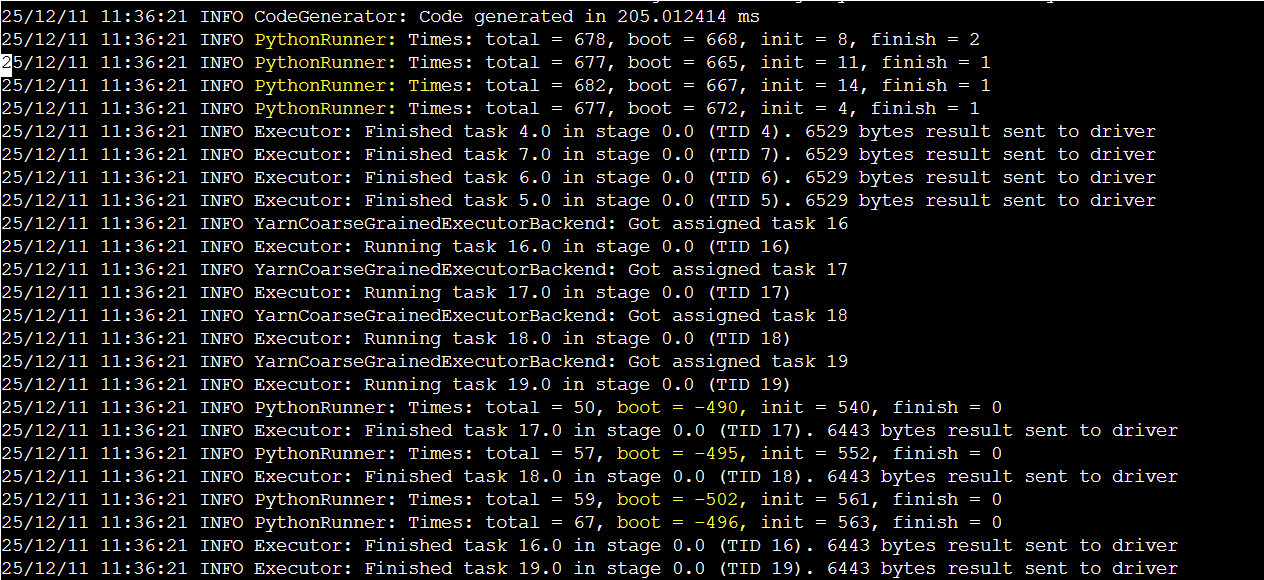
Understanding PythonRunner Logs
PythonRunner logs have 4 values:
total: Total time for the entire Python worked operationbool: Time to start/boot the Python worker processinit: Time to initialize the Python environmentfinish: Time to finalize and clean up the worker